Name the Human
If this is wrong, whose name is on it?
One page, one row per thing that runs without you, ending in a name or a blank you can see.
For whoever runs your automations. You bring access to your automations·3hr·any model·inventory
It ends in: named, turned off, or unresolved, and a count
Watch the two-minute walkthrough 2:19
A two-minute walkthrough: why nobody can say whose name is on what runs without a person, the columns, the verdict, and how to run the prompt in any model.
The decision it forces
If this is wrong, whose name is on it? Not a team, not a role, not whoever is on call: a person. The question isn't "is it secure" or "is it compliant". It is narrower and harder to wriggle out of.
It applies to every surface where something acts on its output without a human deciding first. A linter doesn't count, because a person reads the result and decides. A scheduled job whose output goes straight into a channel someone acts on does.
To run it, copy the prompt below into any model you already use. Builders can run the same method as a read-only script, under For builders.
Decisions nobody is making any more
Most of us are running things we never individually approved. A scheduled workflow someone added two years ago. A cron that posts to a channel. A hook that fires on every commit. An agent with an API key. Each one was a reasonable idea at the time, and together they are a set of decisions nobody is making any more.
The fields
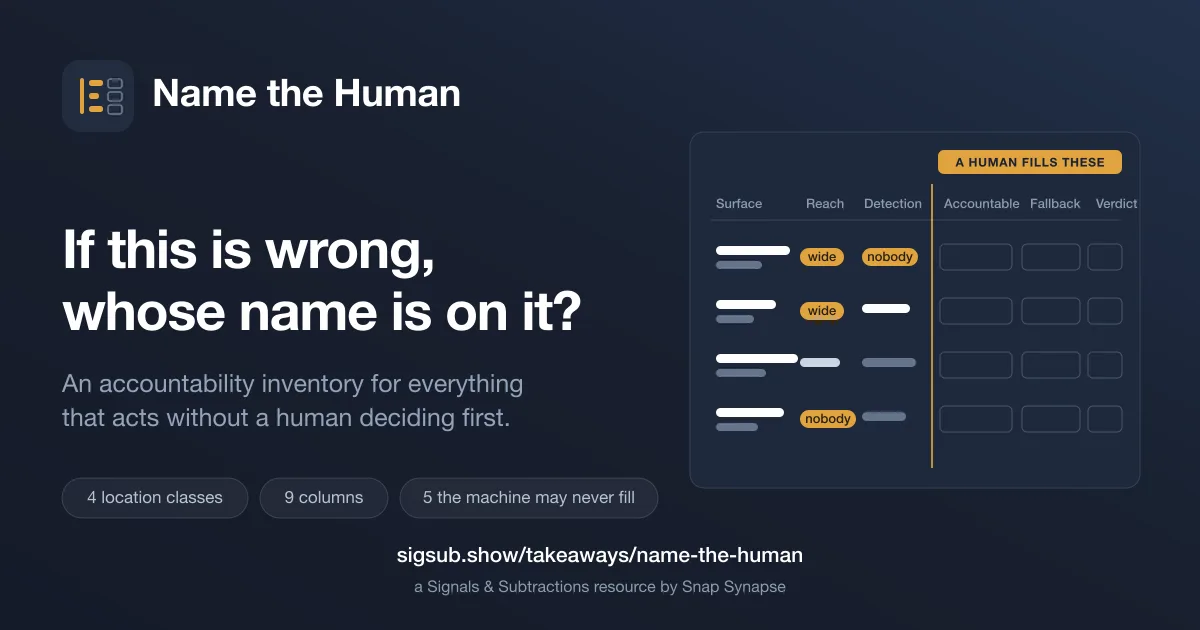
One page, nine columns, one row per surface. The left of the table is filled by a machine. The right is five columns a machine may never fill, and the tool emits null and moves on.
| Column | What goes in it | Who fills it |
|---|---|---|
| Surface | What the thing is | machine |
| Unattended action | What it does when nobody is watching | machine |
| Who finds out, and how long | Who notices if it goes wrong, and how long that takes | machine |
| Reach | How far the damage goes | machine |
| Accountable | The person whose name is on it | you |
| Fallback | Who stands in for them | you |
| Can they stop it alone | Whether that person can stop it without asking | you |
| Last human check | When a human last looked | you |
| Verdict | Named, turned off, or unresolved | you |
That emptiness is the deliverable. A register where every owner field is populated with a squad name tells you nothing. A page where four rows say nothing at all in the accountable column tells you exactly where to spend Thursday.
The four machine columns, Surface, Unattended action, Who finds out and Reach, are what the prompt ranks by to say which rows to look at first. The verdict reads Accountable. Fallback, Can they stop it alone and Last human check don't set it; they say whether the named person could actually act on the day, which is what a name is for. Behind the table, the JSON also records where each surface lives, its schedule, any ownership the repo already claims, the names of keys it uses, whether it moves personal data, and the line each judgment came from, so every claim on the page can be checked; its killed count is the rows turned off. There's no worked example on this page: a filled inventory names real systems and real people.
The verdict rule
Each row's verdict is named when accountable holds a person's name, turned off when we switch the surface off, and unresolved until one of those is true. A team, a role or "whoever is on call" is a blank, not a name, so it leaves the row unresolved. Every verdict starts there, and only we change it. The page ends in a count: how many you reviewed, how many you named, how many you turned off. The last number is the one worth reporting.
Run it with any model
It works in two modes, with the same output. If the model can read files, it scans only the directories you name, and its list of places to look is written for whoever keeps the schedules, hooks and keys. If it can't, it interviews you in plain words about what runs without you touching it, which is the mode most operators will use.
Help me build an accountability inventory of the automated things my
organisation runs. For each one I am answering one question: if this is wrong,
whose name is on it? This is not a security audit or a compliance exercise.

A surface counts if something acts on its output without a person deciding
first. A linter does not count, because a person reads it and decides. A
scheduled job whose output someone acts on does count. When in doubt, include it
and let me cut it.

HOW TO FIND THEM
If you cannot read my files, INTERVIEW me: ask what runs without anyone touching
it, at most three questions at a time, until I say stop.
If you can read files, SCAN only the folders I name, never my whole home folder
or the current folder unless I name it. Look where schedules, hooks and keys are
kept: scheduled workflows and cron entries, launch agents, hook files,
registered MCP servers, webhooks, and anything holding an API key. Record what
any CODEOWNERS file claims, as evidence only. List every file you opened and
anything you skipped.

FOR EACH SURFACE, FILL
- id, stable across runs; surface, in the words I would use to a colleague;
  location; schedule, as written
- existing_owner_signal: what the repo or platform already claims about
  ownership, quoted. Evidence, never an answer to whose name is on it
- secret_names_referenced: the names of any keys it uses. Never a value
- unattended_action: what it does when nobody is watching. Drafts and sends are
  different surfaces; do not merge them
- detection.who_finds_out and detection.lag: who notices if it is wrong and how
  soon. "nobody" and "never" are answers; so is "not-determinable-from-source"
  when the source shows neither
- blast_radius: internal-draft, internal-decision or external;
  moves_personal_data: true or false
- stop_authority.how: how it is actually stopped, or "unknown"
- basis: under each judged field, a short quote of the line you judged it from

RULES YOU DO NOT BREAK
1. Leave accountable, fallback, last_human_check, stop_authority.can_stop_alone
   and stop_authority.ever_tested as null. Never name, suggest or infer a
   person, from commit history, file ownership, CODEOWNERS or anything else.
2. If I answer with a team, a role or "whoever is on call", tell me that is a
   blank and do not record it.
3. Leave every verdict as "unresolved". Do not invent surfaces, guess, or
   soften.
4. Do not ask for credentials, customer names or secrets.

OUTPUT
Valid JSON matching the schema name-the-human/v0.3 at
https://raw.githubusercontent.com/snapsynapse/skill-name-the-human/v0.1.0/name-the-human/references/schema.json,
with a manifest of what you scanned, skipped and would add next time, and
totals: reviewed, named 0, killed 0, unnamed_still_running equal to reviewed.
Then a table, one row per surface: surface, unattended action, who finds out and
how long, reach, accountable, fallback, can they stop it alone, last human
check, verdict, with the last five left for me. End with the shortest list of
surfaces to look at first, by blast radius and then detection lag, and why.
What to check in the answer
It may scan the folders we name or interview us, and fill the four machine columns, with a quoted line behind each judgment. It may never name, suggest or infer a person, never record a team as one, never fill the five human columns, and never set a verdict beyond unresolved.
The part that's not optional
Fill the five human columns yourself, alone, in one sitting. Do not delegate it, do not let a model draft it for you, and do not accept a team name in the accountable column. The moment a machine fills that field, the only load-bearing claim on the page is gone and you are back to a register that looks complete and means nothing.
Then act on the count. A surface with no name, no detection and wide reach is not a documentation problem. It is a thing to turn off.
For builders
The scripts, schema and privacy statement on GitHub Download the skill, v0.1.0
The download is a tagged release, v0.1.0, of the repository above. Read it before a model runs it; its own README says whether it publishes an assistant guide.
Running it as a script
The method also ships as a small read-only tool, and the two buttons above are the whole distribution. Plain Node 22, no dependencies to install, MIT licensed, and every line is readable in an afternoon. If you use Claude Code or Codex, the download is an agent skill your harness can load directly; if you do not, it is five scripts you can run by hand. The copy-paste prompt above works in any model and needs nothing installed.
The privacy posture matters more than usual here, because the thing reads dotfiles. It reads only. It writes exactly one file, the output path you name. It makes no network calls of any kind, in any script. It records the names of secrets it sees, such as EVAL_API_KEY, and never their values, and the test suite checks that a fixture value cannot reach the output. It refuses to run without directories you name out loud, because there is no safe default for a tool like this. Every file it opened is listed in its own output, so you can check exactly what it touched.
The repository carries the schema, the privacy statement in full, and a table of every path the harvest reads and why.
The answer format
The schema isn't embedded on this page. It lives with the method in the skill-name-the-human repository on GitHub, at the version the prompt names, and the prompt links to the exact file.
Report back
Ran this? Tell us what happened. What broke and what you changed are the useful parts, because that's how the next version gets better.
Or write to hey@sigsub.show with Takeaway: name-the-human as the subject. It's a plain email: no form, no account, nothing tracked. Nothing you send appears here unless you say yes, and you choose how you're named.
Rather talk it through in public? Comment on the Sunday issue on Substack, the same issue on LinkedIn or the episode on YouTube. Those threads live on their platforms, under their rules; nothing from them runs on this page.
Keep the next choice in view
One signal, one subtraction and one analogy every Sunday. Five minutes, no video required.
Optional. Free on Substack, no account needed. Already on LinkedIn? Subscribe there.